Search This Blog

Wednesday, June 1, 2011

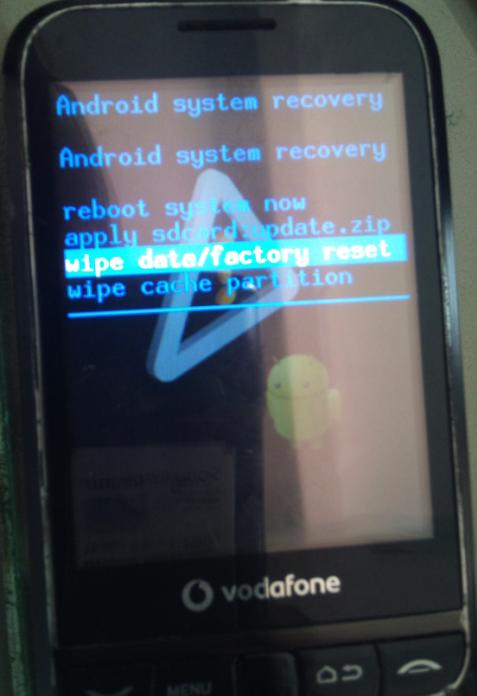
Android Vodafone 845 Hard Reset

Enter recovery mode by turning your device on while holding down 'volume up' and 'Start call' (green) then powering on your device.

Wipe user data


Vodafone 845 aka HUAWEI u8120

Android,
1-how to put phone on ftm mode?
cable inserted, baterry out ,key call+ end call and insert batery, lcd become violet.

More news will come

Sunday, May 29, 2011

Samsung Galaxy Ace GT-S5830 hard reset

all step 100% working
solution: only HARD RESET your galaxy ace.

method 1:
1. Press and hold the power and menu key for few second untill you enter the restore menu
2. After the menu show choose “wipe data/factory reset
3a. Select yes and your phone will be restore to default
3b. After finish choose reboot now
4. It will restart. Don’t panic because it take few minute until complete.
5. Don’t panic just wait. If there is no response in 10 minute just release your battery and put it back again and repeat from first step.
Note;
-use menu key to select.
-use volume up down to choose the menu.
-make sure u have enough power in ur batttery.
100% work coz it from >50 time key combination trial and error.
damn even samsung don’t write how to do this technique. thanks i have mangenkyo sharingan.

method 2:
1. go to setting~>privacy~> factory data reset.
OR
2. dial *2767*3855#
all of this method will make the same effect to your phone: -”reset your phone to factory setting”

Motorola Milestone 2 Hard Reset


1. Hold X and Power Button while booting up. You will see the triangle.
2. Hold Volume UP and then Camera button to get to recovery menu.
3. Use volume down to select factory reset.
4. Use D pad to select that option. (I was using power button previously)
5. You get another menu that asks you to confirm that you want to wipe out the data.
6. Select yes option .
7. Phone factory resets and boots properly.
OR:     X +power =>  Than @//\

Motorola XT720 Hard reset

I
f for some reason you are unable to access the factory reset function directly from the phone, you may need to perform a "hard" factory reset.
The correct way to hard reset the Motorola Milestone XT720™ is as follows.

1) With the phone powered off, press and hold the Camera, Gallery and Power buttons simultaneously.

2) When the Triangle/Exclamation point screen pops up, press the volume up + gallery keys down and tap the camera key.

3) When the recovery window pops up, use the volume up/down keys to navigate the menu and the camera key to enter your selection.

Samsung Galaxy i9020 Hard Reset

1.Turn power off phone
2.hold volume up and press power on, you will see this:

3.use vol-up/vol-down to select enter recovery then press power.
phone will restart & show adroid icon:

4.Now press power & volume up, we'll see:


5.select:  wipe data/factory reset  and press power


6.Select "Yes" then press power: Now Start formatting

5.Wait for phone reboote. Done